Flink SQL and compute pools
Design Confluent Cloud Flink SQL statements, the compute pools they run in, and what each statement reads and writes.
A Flink SQL statement
Drag Flink SQL from the Processing palettes, wire one or more topics into its Input, and wire its Output to the topic it writes. In Confluent Cloud every topic is also a Flink table, so there is no separate table asset: the topic is the table.
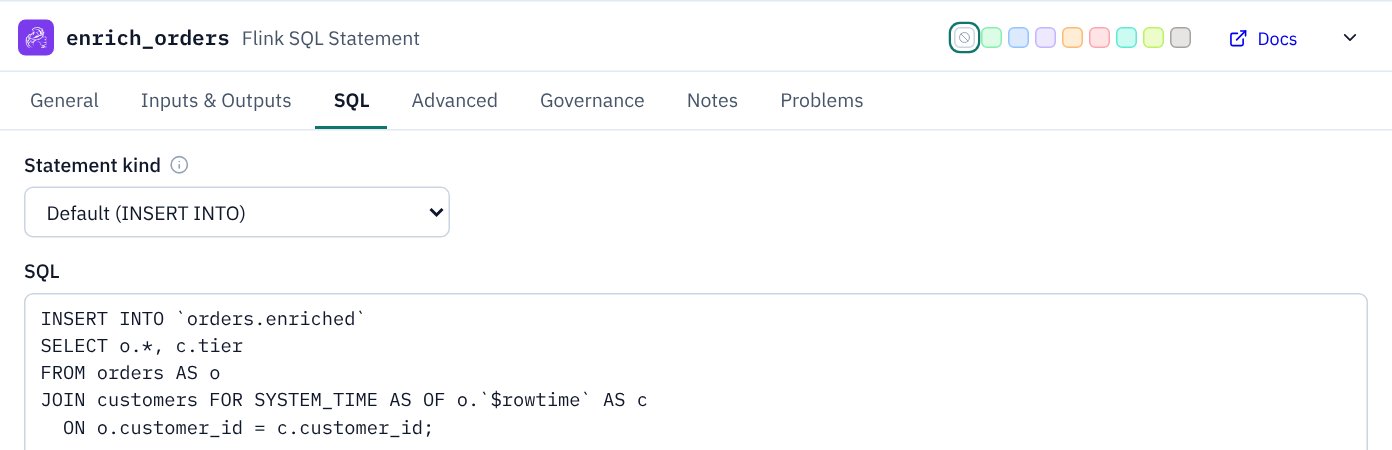
The statement's tabs:
- General: the statement name, its Compute pool, and the Service account it runs as.
- Inputs & Outputs: what is wired to each port, like every asset has.
- SQL: the statement kind, the SQL itself, written here or kept in its own file, and settings such as state TTL.
- Advanced: further statement properties, for when the design needs them.
Its ports are Main input, Join input (on the bottom edge, so the main flow stays left to right), UDFs / models, Output and Errors.
Errors and dead letter topics
Wire Errors to a Dead Letter topic for the records the statement can’t process. A statement can send errors to more than one Dead Letter topic:
- One per input. In Confluent Cloud a Flink dead letter queue is set on each source table, with
'error-handling.mode' = 'log'and'error-handling.log.target'naming the DLQ table. A statement that joins two topics can send each one’s bad records to its own DLQ. (These catch records that can’t be read; see Confluent’s Configure a Dead Letter Queue.) - Routed in SQL. SQL can write rejected rows to several topics itself, for example one statement set with an
INSERT INTOper kind of rejection.
With more than one, say on each Errors wire which records go there: select the wire and fill in Condition, such as orders: deserialisation failures. KPD reminds you until every wire says, the label shows on the canvas, and the design document’s DLQ table lists it as the reason. Streaming Agents, Kafka Streams apps and Stream Apps can send errors to several DLQs too. A connector has one DLQ, and so does a topic’s contract Rejected output, because Confluent gives each of those a single DLQ setting.
Statement kinds
| Kind | Use it for | Outputs |
|---|---|---|
INSERT INTO | A continuous query writing into an existing table (topic). The default. | One |
CREATE TABLE AS | A query that creates its own table and topic. | One |
CREATE MATERIALIZED TABLE | A table definition and its continuous query in one object, evolved in place. | One (its backing topic) |
EXECUTE STATEMENT SET | Several INSERT INTO statements run as one job. | Several |
Writing to several topics: statement sets
One Flink job can write to more than one table. Set Statement kind to EXECUTE STATEMENT SET, wire the Output to each topic, and write the inserts in one block:
EXECUTE STATEMENT SET
BEGIN
  INSERT INTO `incl.prod.ent.booking.high-value.v1`
    SELECT * FROM bookings WHERE amount_gbp > 5000;
  INSERT INTO `incl.prod.ent.booking.standard.v1`
    SELECT * FROM bookings WHERE amount_gbp <= 5000;
END;
It runs as one statement, and the planner can read a shared source once. KPD warns when any other kind has more than one output, because each of those writes to a single table.
Materialized tables
With CREATE MATERIALIZED TABLE, the SQL tab offers START_MODE (with a start point for the timestamp and interval modes), the primary key, DISTRIBUTED BY … INTO n BUCKETS, changelog.mode, and whether the column list is declared explicitly (recommended). The topic wired to the Output is the table's backing topic: the materialized table creates and owns it. KPD warns if nothing is wired, or if anything else writes to that topic, and the node's subtitle reads Materialized.
CREATE TABLE AS or a materialized table) are not created again by the Terraform export.SQL is not checked
That means KPD will not tell you when:
- the SQL has a syntax error, or uses a function or clause Confluent Cloud Flink doesn't support;
- a table or column it names doesn't exist, or a column's type doesn't match the topic's schema;
- the tables in
FROMandINSERT INTOdiffer from the topics wired to the statement's inputs and output; - the SQL doesn't match the Statement kind chosen (for example
INSERT INTOtext under CREATE MATERIALIZED TABLE).
What KPD does check is the design around the SQL: the wiring, the statement kind against the number of outputs, the materialized table options, the compute pool and the service account.
EXPLAIN) against the real topics. The same applies to ksqlDB queries.SQL in its own files
A statement can keep its SQL in a file of its own, in the project’s sql/ folder, instead of inside the pipeline. In Git a file reads, diffs and reviews as SQL: a one-word change shows as one changed line, not one long changed string in the pipeline file. It also opens in any editor, and SQL tools can run over it.
- The SQL folder. In the explorer, Stream configuration → SQL lists the files. Right-click it for New SQL file… and New folder…; subfolders work as they do for schemas. Click a file to edit it, and right-click it to rename, move, duplicate or delete it. A rename or move updates every statement that uses the file, including pipelines that aren’t open.
- Attach a file. On the statement’s SQL tab, choose it under SQL file, or + New SQL file…, which starts from the statement’s current SQL. The tab then shows the file’s SQL in place of the inline SQL box.
- Read-only, on by default. The SQL shown from a file is read-only until you untick Read-only, so nobody changes it by accident. Edits save to the file (not the pipeline) when you leave the editor or press Save file.
- Share a file. Several statements can use one file, for example the same statement in a dev and a prod pipeline. A shared file shows the shared-asset link icon with how many statements use it, on the SQL tab and in the explorer, so you know an edit reaches them all. Two statements running the same file on the same cluster would do the same work twice, so KPD warns about that (within a pipeline as you work, and across pipelines in Validate project).
- Moving inline SQL to files. On a statement’s SQL tab, Move SQL to a file writes it to
sql/<pipeline>/<statement>.sqland attaches it. To do every statement at once, right-click SQL → Move inline SQL into files…. Existing files are never overwritten. Pipelines that aren’t open are saved straight away; open ones are left for you to save, and Undo puts the SQL back inline.
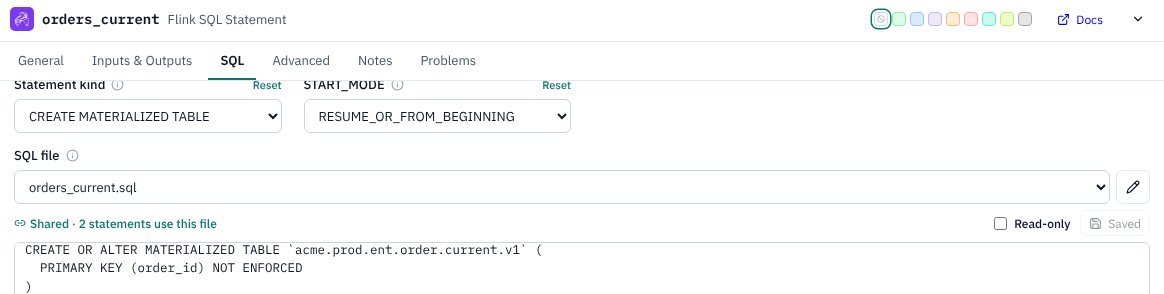
Inline SQL still works as before, so existing designs need no change: a statement uses its file when one is attached, and its inline SQL otherwise. As with inline SQL, KPD doesn’t check what’s in the file. The Terraform export deploys the file’s SQL exactly as written, and the design document shows it under the statement, saying which file it came from. A missing file is a warning on the statement, and a TODO in Terraform.
Compute pools
Statements run in a Flink compute pool. Define pools in the project explorer: right-click Flink compute pools → New Flink compute pool… and give it a name, cloud, region and maximum CFUs (5 to 50). The New project dialog can add them at the start, and the Data Product template adds one pool per stage. Then pick the pool on each statement's General tab.
A pool that already exists in Confluent Cloud can be given its Existing pool ID, so Terraform refers to it instead of creating it.
Pool capacity
Every running Flink statement takes at least 1 CFU from its pool, so KPD counts the statements on each pool:
| Statements on the pool | KPD says |
|---|---|
| Fewer than its max CFUs | Fine. The pool’s hint on a statement’s General tab shows how much it already claims, e.g. 4 statements in this pipeline: at least 4 of 10 CFU. |
| Exactly its max CFUs | A warning: the statements run, but none can scale above 1 CFU. |
| More than its max CFUs | An error on each statement: they can't all run. Raise the pool's max CFUs or move statements to another pool. |
A statement set or a materialized table counts as one statement. Badges and the Problems tab count the statements in the open pipeline; Validate project adds up every pipeline that shares the pool and lists each pool's usage.
Other processing assets
- UDF, AI Model and Streaming Agent: Flink functions, model inference and agents, drawn alongside the statements that use them.
- ksqlDB: cluster, persistent query, stream and table, for designs that still use ksqlDB.
- Kafka Streams app: your own stream processing application, with its application id and service account.