Terraform
Generate a Terraform starting point for the Confluent provider from your design, with every credential left to your CI.
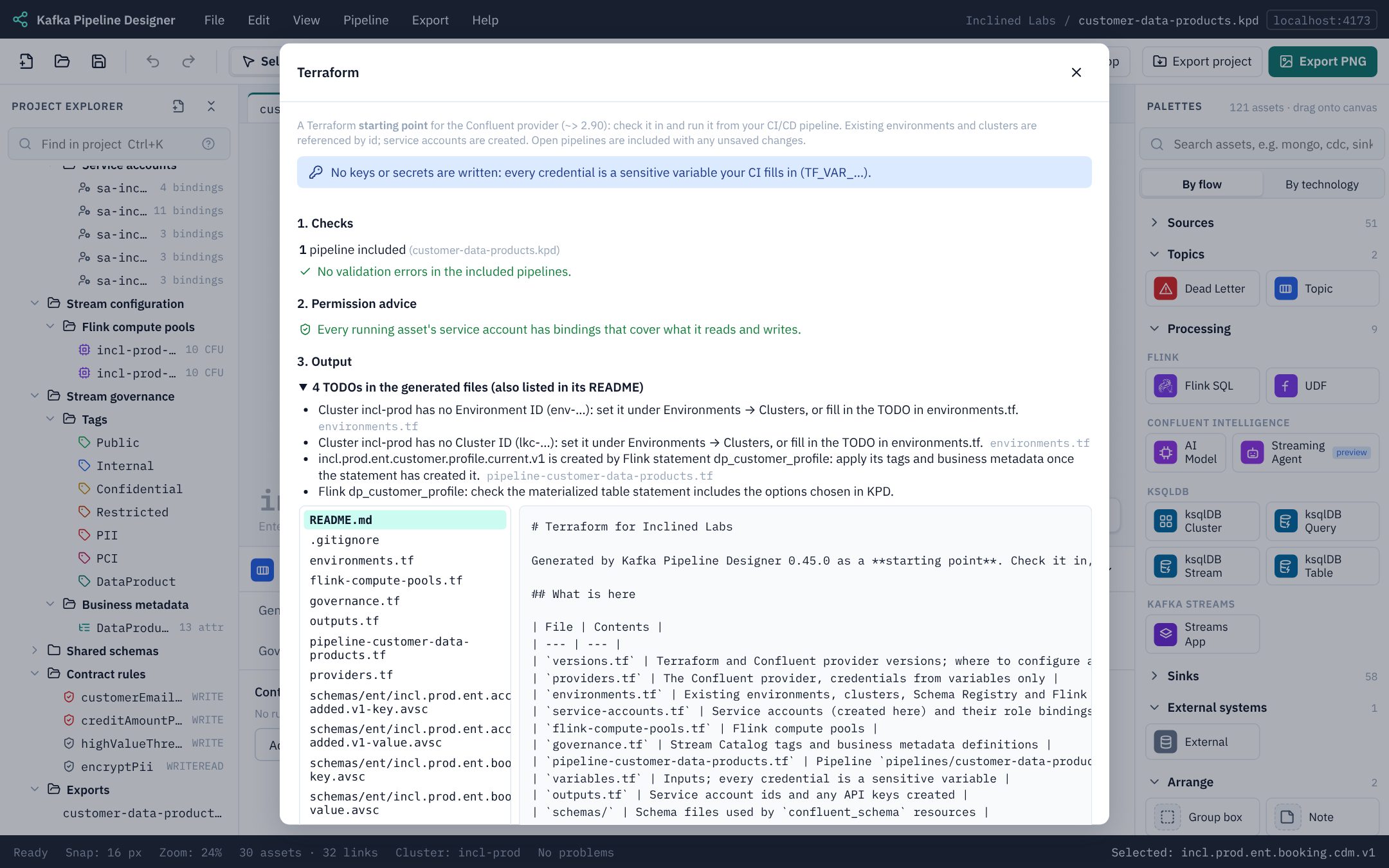
Generating
Choose Export → Terraform… The page shows three things in order:
- Errors from validation, which block generating until they are fixed: for example two pipelines that describe the same topic differently.
- Permission advice: role bindings your running assets seem to need, each unticked. Tick the ones you want; KPD never adds them for you (see Service accounts and access).
- The files, to preview, then Download .zip to take them away, or Write to exports/terraform/ to keep them with the project (they’re then in its Export project (.zip) too).
What is generated
One root module, with a file per pipeline:
| File | Contents |
|---|---|
versions.tf, providers.tf | Terraform and Confluent provider versions; the provider with credentials from variables only. |
environments.tf | Existing environments, clusters, Schema Registry and Flink regions, referred to by id. |
service-accounts.tf | Service accounts and their role bindings, as you entered them. |
api-keys.tf | API keys for accounts ticked to have one. |
flink-compute-pools.tf | Compute pools (existing pools are referred to by id). |
governance.tf | Stream Catalog tags and business metadata definitions. |
pipeline-<name>.tf | Each pipeline's topics, schemas with contract rules, tag and metadata bindings, connectors, Flink statements and ksqlDB clusters. |
flink/<statement>.sql | The SQL of each Flink statement, in its own file named after the statement (for example flink/booking-raw-to-cdm.sql). The pipeline's .tf loads it with file(), so the SQL can be reviewed and changed as SQL. |
schemas/ | The schema files the confluent_schema resources load. |
variables.tf, outputs.tf, terraform.tfvars.example | Every credential and connector secret as a sensitive variable, plus any setting a connector needs that the design doesn’t hold (usually its login user name); useful outputs. |
README.md, .gitignore | What was included and left out, the TODOs, and how to run it. |
- Existing topics and schemas are looked up (
datasources), not created. - Topics created by Flink itself (
CREATE TABLE AS, materialized tables) are not created again. - Flink SQL is copied in exactly as written, one
.sqlfile per statement. Editing a file and applying replaces that statement in Confluent Cloud, so plan how it resumes first.terraform validatedoesn’t check the SQL, so an SQL mistake first shows up when Confluent Cloud runs the statement onapply(see SQL is not checked). - Connectors are written with the settings each one needs, checked against Confluent’s documentation for every managed connector. A setting the design doesn’t hold, such as the database user name, becomes a variable for you to set for each environment, and is listed as a
TODO. A KPD property a connector doesn’t have is left out with aTODO, rather than sent and refused. - Self-managed connectors are documented as comments; their accounts and bindings are generated.
- Anything KPD can't fill in, such as a missing cluster id, is a
TODOlisted on the page and in the README.
NoteRe-exporting replaces only the files KPD wrote (listed in
.kpd-generated.json), so files you add to the folder are kept.Running it
Unzip the download (or the exports/terraform folder of an exported project) where your team keeps infrastructure code, then:
cd terraform
export TF_VAR_confluent_cloud_api_key=…      # from your CI secret store
export TF_VAR_confluent_cloud_api_secret=…
terraform init
terraform plan
OpenTofu works the same way (tofu init, tofu plan). The output is checked with tofu validate against the Confluent provider schema.
Review before applyingThis is a starting point, not a deployment. Review the plan, add a remote backend for state, and keep state encrypted: API key secrets exist only in state and sensitive outputs.