Quick add
Build a pipeline at the speed of thought: a + beside every free output suggests what usually comes next.
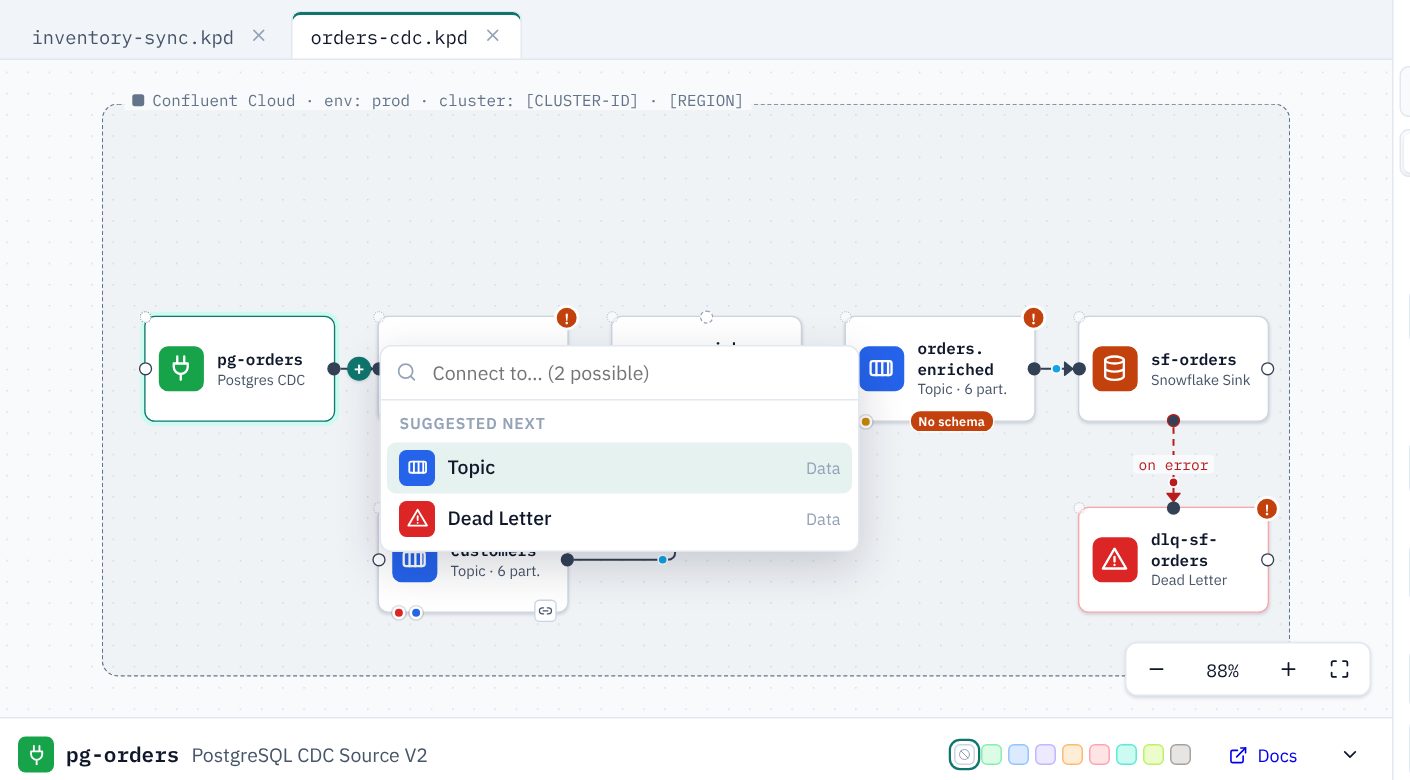
Using it
- Select an asset. A + appears beside each output that can take another connection; it is red for error outputs.
- Click it. A list opens with the best next steps for that output, such as Topic after a source, Flink SQL after a topic, Dead Letter after an error output, or the connectors that fit an External system (see Starting from the system).
- Type to search everything that can connect there.
- Press Enter (or click) to add the asset beside the source, already connected and selected, so you can keep going.
Other ways in
- Drop on empty canvas: drag a connection from an output and let go on empty canvas; the same list opens, and the new asset goes where you dropped it.
- Anywhere: press / (or Pipeline → Quick add…) with nothing in hand to search every asset and add it near the centre of the view, unconnected.
How suggestions are chosen
Suggestions are never guesses about what is valid: only assets that can really connect to that output are listed, using the same rules as dragging a connection. Only the order is a judgement: the usual next step for that kind of output first (after an External system, the connectors that suit its Kind, with those matching its Technology on top), then assets already used in the pipeline and ones you used recently. Retired asset types are never offered.
TipA Flink SQL statement can keep its + after the first output: a statement set writes to several topics. See Flink SQL and compute pools.