Connectors and external systems
Bring data in and out of Kafka with fully managed connectors, self-managed connectors, and the systems on either side.
Fully managed connectors
KPD has a palette for every current fully managed Confluent Cloud connector: CDC sources (SQL Server, Oracle, PostgreSQL, MySQL, MariaDB, DynamoDB, Spanner and more), JDBC sources and sinks, object storage (S3, GCS, Azure Blob), warehouses (Snowflake, BigQuery, Redshift, Databricks), messaging (MQ, RabbitMQ, Solace, MQTT, Event Hubs, SQS) and SaaS (Salesforce, ServiceNow, Jira, Zendesk). Search the Palettes panel for cdc, sink or a product name.
A connector's tabs follow the connector's own configuration: connection, the tables or topics it covers, output format, transforms and error handling. Its Service account on the General tab is the account it runs as.
CDC sources
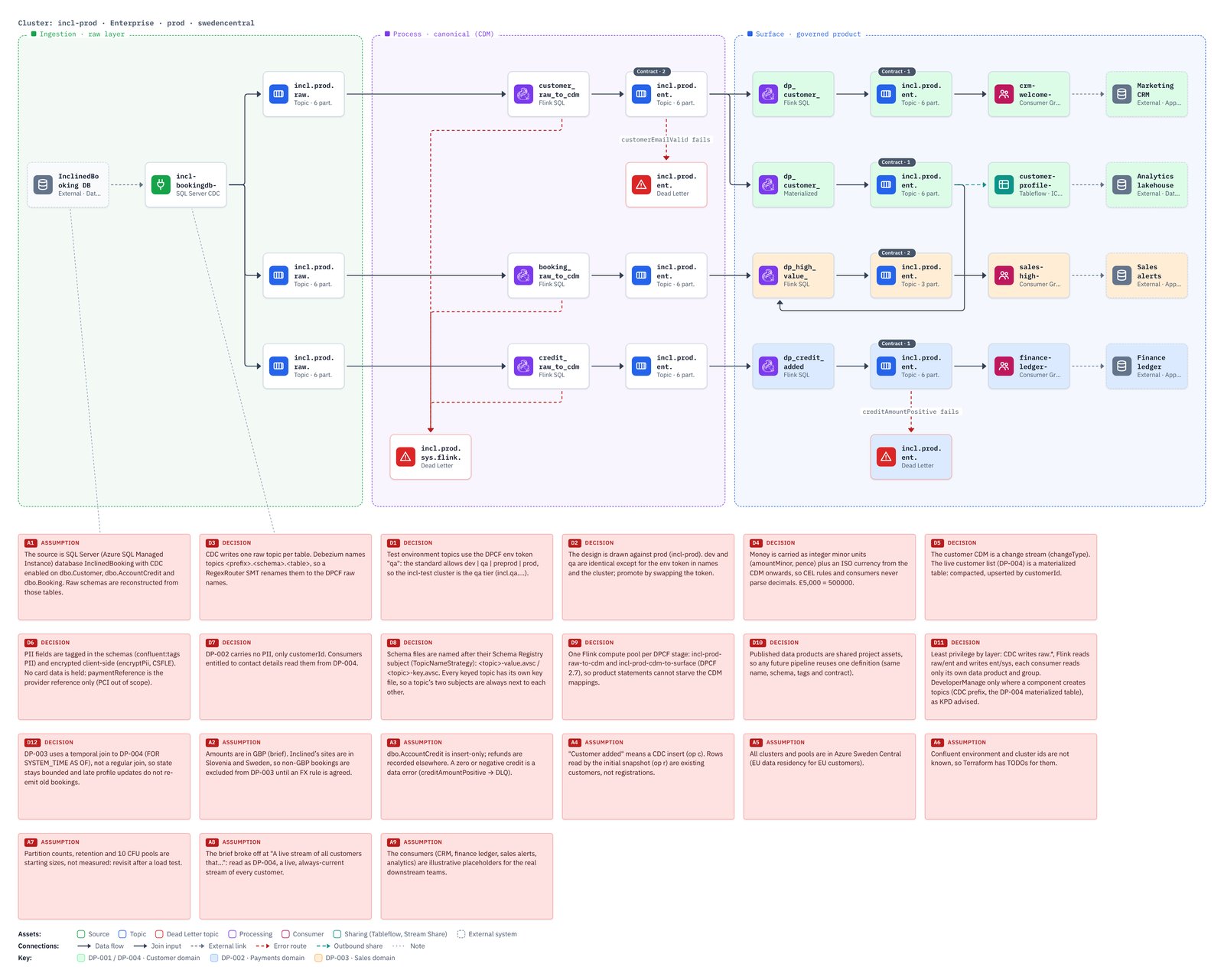
A CDC source writes one topic per captured table and names each topic itself, from its topic.prefix and the table name. List the tables on its Capture tab, set the prefix, and use Add topics in the Problems tab to draw correctly named topics. Terraform creates them before the connector starts, unless a topic is set to Managed by: Connector. The full walkthrough is CDC sources and their topics.
Error handling
Most connectors have an errors output (a red port). Wire it to a Dead Letter topic to show where failed records go; quick add suggests one straight away. See Data contracts and dead letter topics.
Self-managed connectors
Self-managed source and Self-managed sink are the catch-all for anything running outside Confluent Cloud: self-managed Kafka Connect, Oracle GoldenGate, Debezium Server, MirrorMaker 2 or another tool. Pick the runtime and its service account, and list its settings on the Connector tab (credential keys can be listed, never their values). Terraform documents it in a comment and generates its account and role bindings.
External systems
External draws a database, application, API, file store or portal outside Kafka, so the diagram shows where data starts and ends. Wire it into a connector's or producer's External system input, or from a sink's or consumer group's output. External systems are context only: nothing is generated for them.
Starting from the system
Workshops often start with "we have data in…". So start there: on an empty pipeline click Start from a system (it is also first in Add a source), then fill in its Name, Kind (Database, Application, API, File store, Message system, Data portal) and Technology, such as MySQL 8 or Salesforce. Its + then suggests the connectors that fit, best first: for a database, the CDC connectors and then JDBC; for a file store, the storage connectors; and whichever match the technology at the very top. Pick one and it is added and wired.
Existing topics
When a topic is filled by something you don't own (another team, GoldenGate, an older pipeline), draw it anyway and set Managed by to Existing on its General tab. It is drawn dashed with an existing badge, and Terraform looks it up instead of creating it. See Existing topics. A topic a CDC source should create itself is Managed by: Connector; see Who creates the topics.