CDC sources and their topics
How a CDC source connector names and creates its topics, and how to design one in KPD step by step.
How a CDC source behaves
A change data capture (CDC) source connector reads a database's change log and writes every insert, update and delete to Kafka. Three things about it catch people out:
- One topic per table. Each captured table gets its own topic. Capturing two tables means two topics.
- The connector picks the topic names. You don't type a topic name into the connector. It builds each one from its topic prefix and the table's name. MySQL, for example, writes table
ordersin databaseshopto<topic.prefix>.shop.orders. - It creates any topic that is missing. If a table's topic doesn't exist when the connector starts, the connector creates it, with 1 partition and default retention. That is rarely what a design wants.
So in KPD you list the tables, set the prefix, and draw one topic per table with exactly the name the connector will use. KPD works out those names for you and checks them.
Fill in the table list and topic.prefix, then click Add topics in the Problems tab. KPD draws one correctly named topic per table, and the Terraform creates them before the connector starts.
Step by step: a MySQL CDC source
This example captures two tables, orders and customers, from a MySQL database called shop. The other CDC connectors work the same way; only the form of the table names and topic names differs (see Topic names by connector).
-
Add the connector. Search the Palettes panel for mysql and drag MySQL CDC onto the canvas. Give it a name on its General tab, here
shop-cdc. Optionally draw the database as an External system and wire it into the connector's input.Two warnings appear straight away: the connector has a No tables badge because nothing is listed to capture, and it asks for a topic prefix.
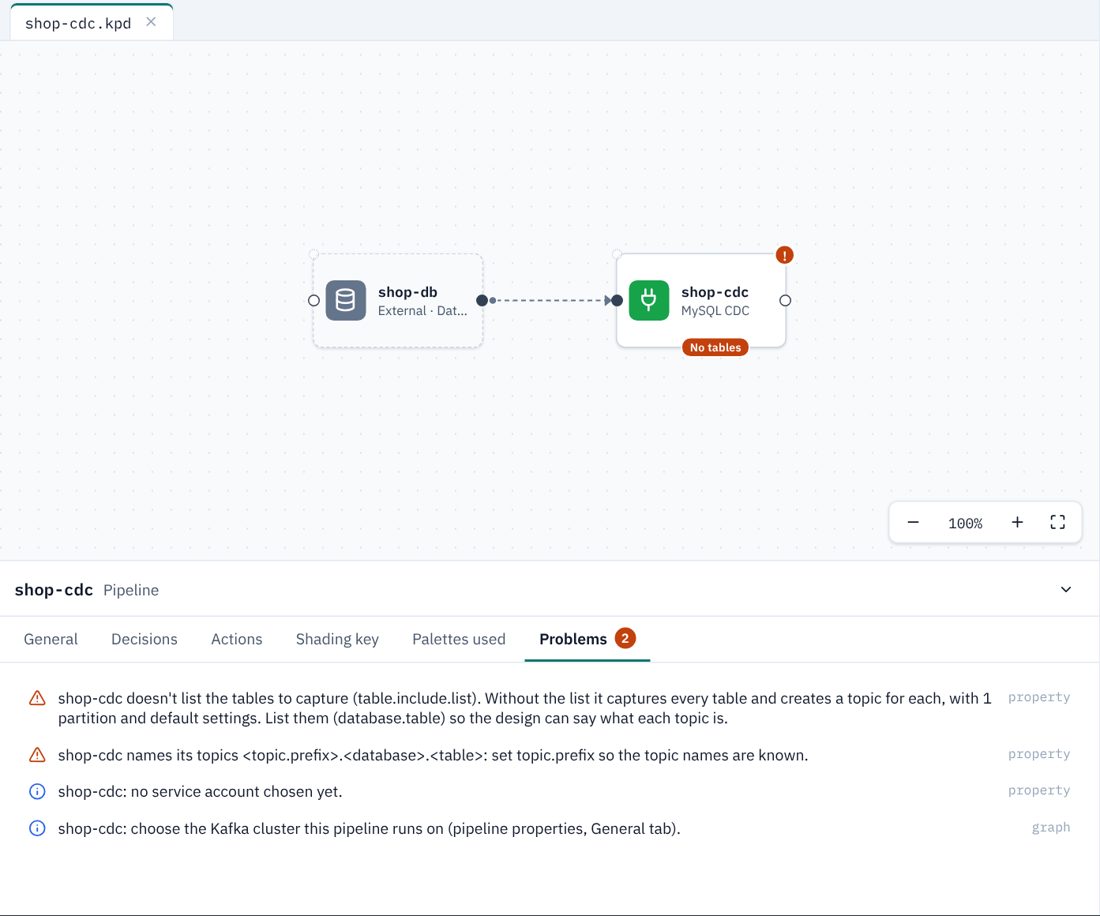
A new CDC source: no tables listed and no topic prefix yet. -
List the tables. Select the connector and open its Capture tab. In table.include.list, list the tables, comma-separated. For MySQL each one is
database.table:shop.orders, shop.customersThe placeholder in the field shows the form your connector expects. The No tables badge goes once the list is filled in.
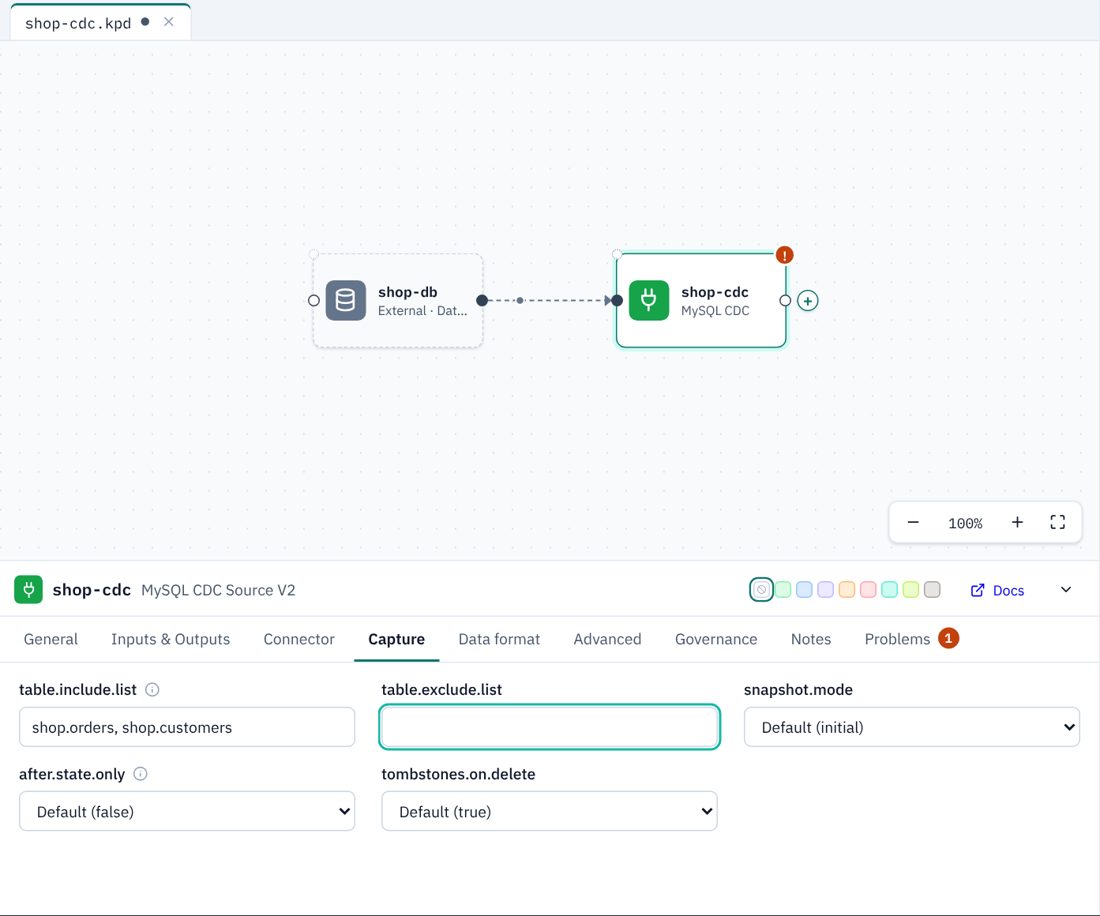
The table list on the Capture tab. Until it is filled in, the warning sits under the field. -
Set the topic prefix. On the Data format tab, set topic.prefix, here
retail. KPD can now work out every topic name, and tells you which ones are missing from the design: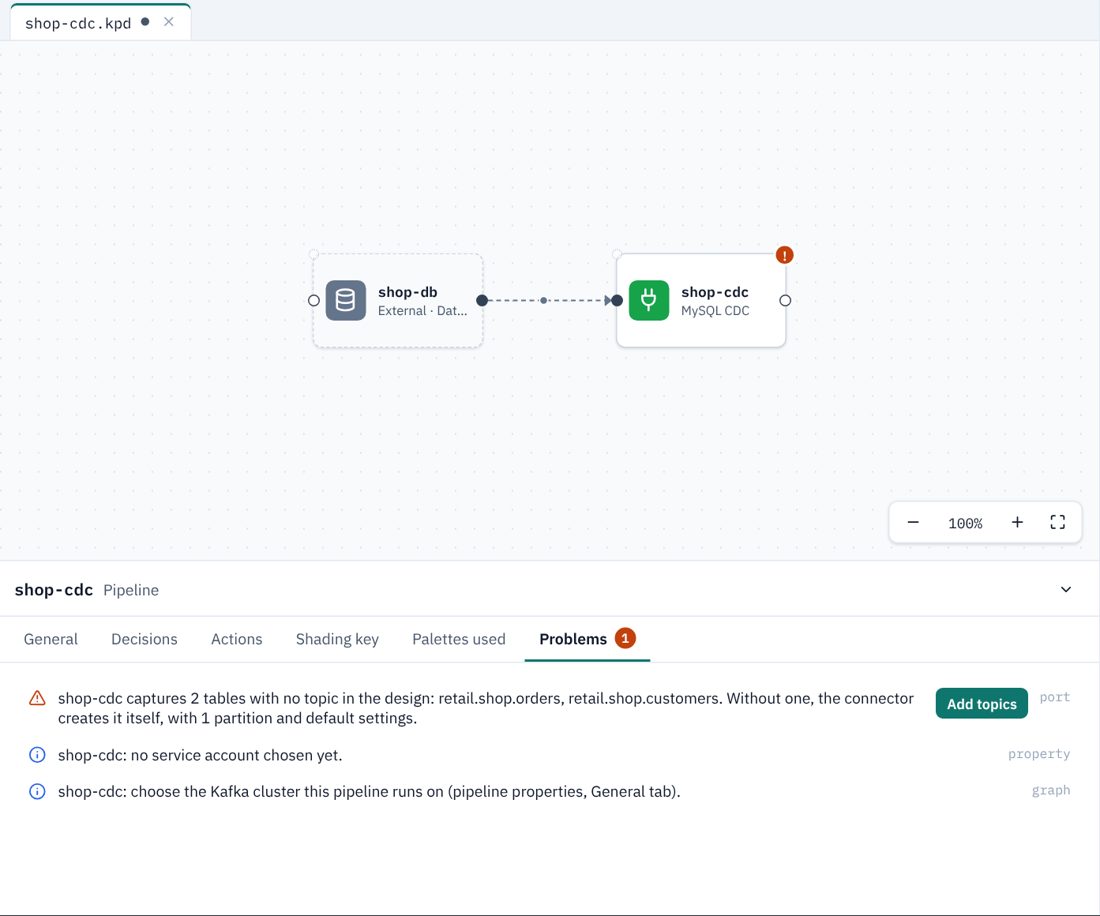
KPD names the topics the connector will write: retail.shop.ordersandretail.shop.customers. -
Click Add topics. KPD draws one topic per table, named exactly as the connector names it, and wires each one from the connector. Press Ctrl/⌘+S to save.
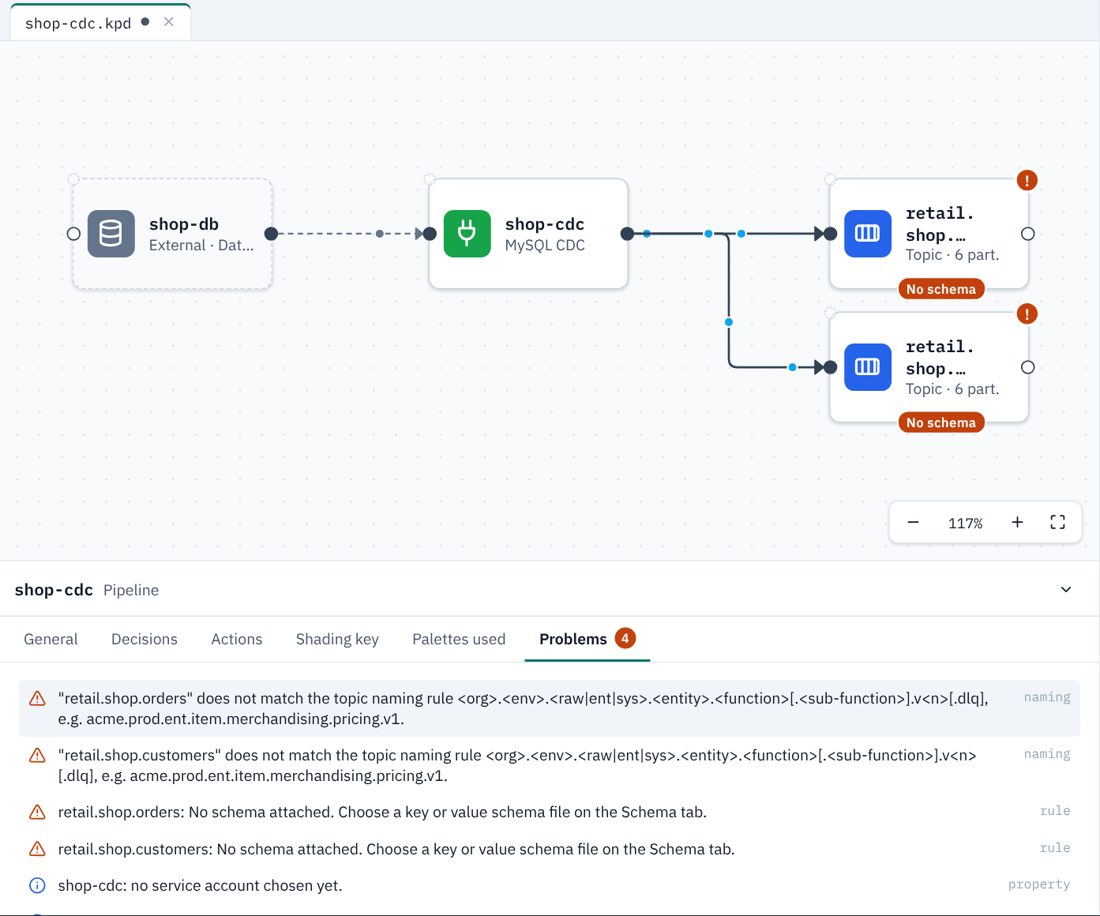
Two topics added and wired. Give each one a schema and settings as usual. Now set each topic up like any other: partitions, retention, a schema on its Schema tab, tags and so on. These are the settings the topic will be created with.
Keeping the names right
KPD keeps checking the names as the design changes.
- A topic with the wrong name. If a wired topic has a name the connector will never write (renamed by hand, or the prefix changed), KPD warns on that topic and offers Rename, which gives it the right name. Where several topics are wrong, KPD pairs them with the tables by name.
- A table with no topic. Add a table to the list and the no topic in the design warning comes back for that table; Add topic draws it.
- Patterns. A table list written as patterns (
shop.order.*) can't be turned into names, so KPD only notes it. Check the topic names yourself against the pattern for your connector.
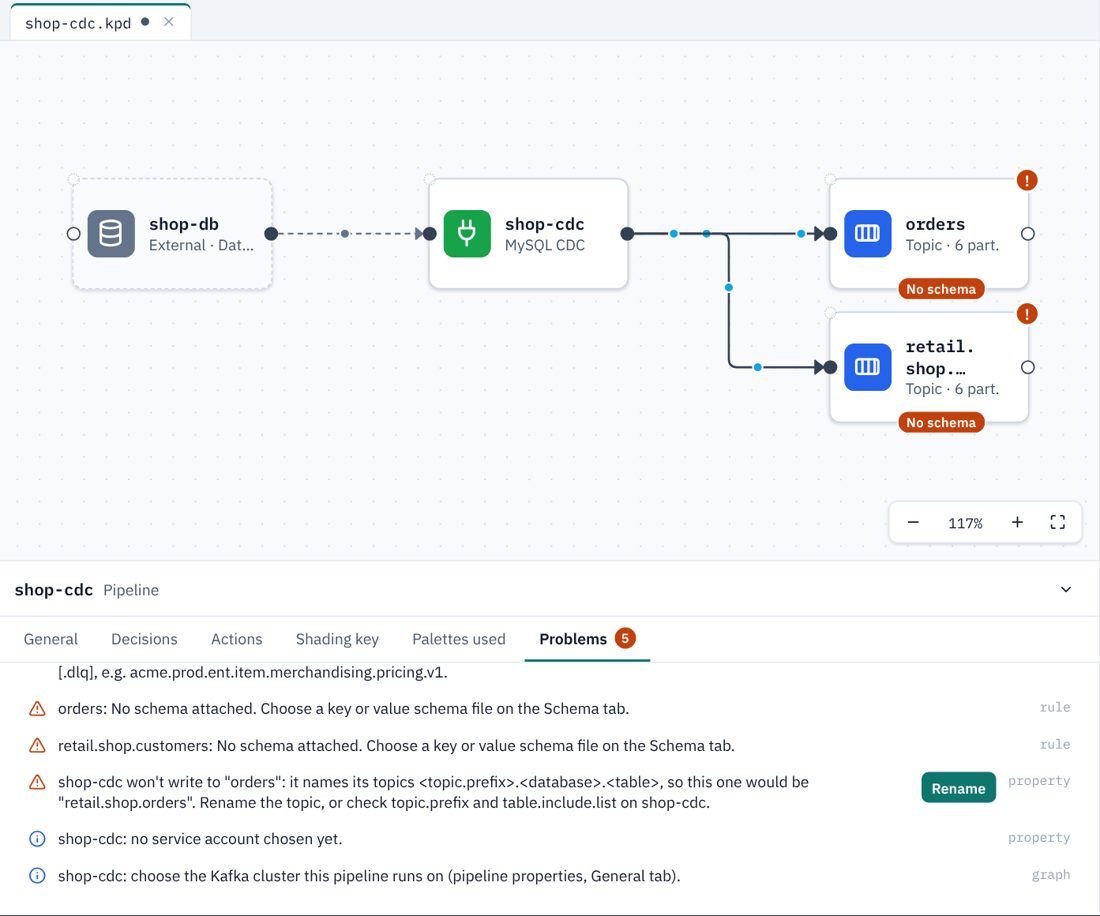
orders would never receive anything: the connector writes retail.shop.orders.Who creates the topics
Every topic has a Managed by setting on its General tab.
| Managed by | What happens | Use it when |
|---|---|---|
| KPD (the default) | Terraform creates the topic, and creates it before the connector, so the connector finds it ready, with your partitions, retention and schema. | Almost always. The design says exactly what each topic is. |
| Connector | Terraform doesn't create the topic; the connector does, the first time it runs. KPD passes the topic's partitions, cleanup policy and retention to the connector. The topic is drawn dashed with a connector badge. | Your team prefers connectors to own their topics. |
| Existing | The topic already exists and someone else owns it. Terraform looks it up and never changes it. | The topic was created by another team or an older pipeline. |
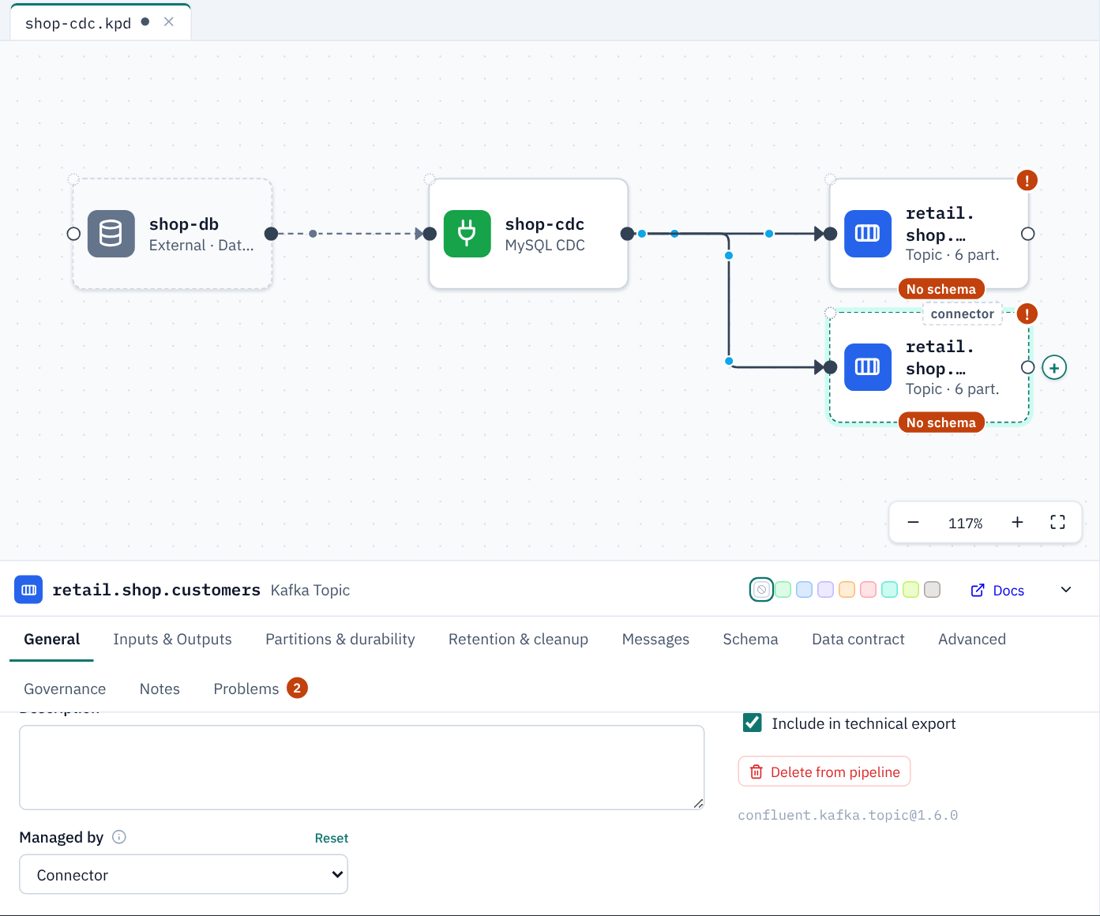
- A connector applies one set of settings to every topic it creates. If two of its topics are set to Connector with different settings, the Terraform uses the first and adds a TODO.
- Only PostgreSQL, MySQL, MariaDB, SQL Server and MongoDB CDC accept these settings. Other connectors create topics with their own defaults (a Terraform TODO says so).
- Tags and business metadata can only be applied once the topic exists, so the Terraform leaves them as a TODO.
What the Terraform does
- The Terraform page won't generate while a CDC source has no table list: the connector would otherwise create a topic for every table in the database.
- Topics that KPD manages are
confluent_kafka_topicresources, and the connector has adepends_onon them, so they are always created first. - Topics set to Connector are not resources. Their settings appear in the connector's configuration as
topic.creation.topic_prefix_match.partitions,…cleanup.policy,…retention.msand…retention.bytes. - A wrongly named topic, or a table with no topic, is also listed as a TODO in the generated files.
Topic names by connector
| Connector | Table list (Capture tab) | Topic for each table |
|---|---|---|
| PostgreSQL CDC V2 | schema.table | <topic.prefix>.<schema>.<table> |
| MySQL CDC V2, MariaDB CDC | database.table | <topic.prefix>.<database>.<table> |
| SQL Server CDC V2 | schema.table, or database.schema.table when database.names lists several databases | <topic.prefix>.<database>.<schema>.<table> |
| MongoDB CDC | database.collection (collection.include.list) | <topic.prefix>.<database>.<collection> |
| DynamoDB CDC | table names | the table name |
| Oracle CDC, Oracle XStream | a regular expression / schema.table | Not worked out by KPD: Oracle builds names from a template that includes the database SID or PDB. Check them against the connector's documentation. |
| Spanner CDC | the change stream (it decides the tables) | Not worked out by KPD: Spanner names topics after the connector's id, which only exists once it is created. Consider Managed by: Connector. |
CDC names and your naming standard
Names like retail.shop.orders often don't match a house naming standard such as the DPCF rule (<org>.<env>.raw.<entity>…), so you will also see a naming warning on each topic. Two ways to handle it:
- Choose the prefix to fit. A prefix such as
acme.prod.rawgivesacme.prod.raw.shop.orders, which gets close. - Rename on the way out. Add RegexRouter to the connector's SMT chain (Advanced tab) and name the topics to your standard, as the Inclined Labs sample does. KPD can't predict names a transform produces, so it then only checks there is one topic per table. The SMT chain is recorded in the design; the transform's own settings are added to the Terraform by hand.
Questions
Can I capture a whole database without listing its tables? The connector can, but KPD asks for the list on purpose: without it, nobody can say which topics will appear, or with what settings. List the tables you need.
The topic names are too long to read on the canvas. Hover over a topic, or select it, to see its full name. The names are long because they are the real names in Kafka.
Does KPD connect to my database to find the tables? No. KPD never connects to anything; the table list is what you type.