Assets and palettes
KPD has 121 asset types, from topics and dead letter topics to every fully managed Confluent Cloud connector.
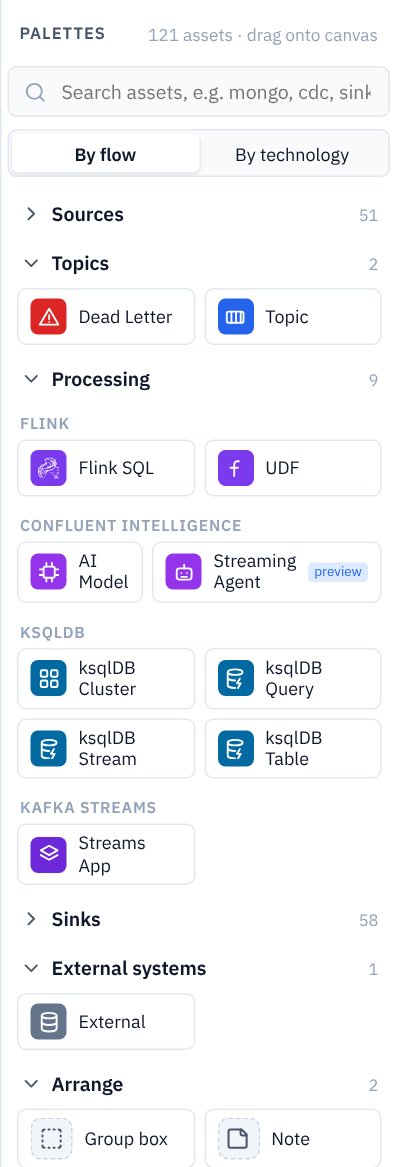
Finding a palette
The Palettes panel groups assets by flow (Sources, Topics, Processing, Sinks, External systems) or by technology (Kafka, Connect, Flink, ksqlDB…). Type in the search box to filter, for example mongo, cdc or sink. Each palette's Docs link (in the properties panel header) opens the matching Confluent documentation page.
The main families
| Family | Assets |
|---|---|
| Topics | Topic and Dead Letter topic. A topic carries its partitions, retention and cleanup, key and value schemas, data contract rules and governance. In Confluent Cloud every topic is also a Flink table, so topics wire straight into Flink SQL. |
| Sources Sinks | Every current fully managed connector (CDC, JDBC, NoSQL, object storage, SaaS, messaging…), plus Self-managed source / sink for anything running outside Confluent Cloud. See Connectors and external systems. |
| Clients | Producer, Consumer Group, Share Group: your applications, with their client ids, group ids and the account they run as. |
| Processing | Flink SQL statements (including statement sets and materialized tables), UDF, AI Model, Streaming Agent, ksqlDB (cluster, query, stream, table), Kafka Streams apps and a generic Stream App (a consume-transform-produce service running outside Confluent Cloud, e.g. an AWS Lambda). See Flink SQL and compute pools. |
| Sharing | Tableflow (topics as Iceberg or Delta tables) and Stream Share. |
| External systems | External: a database, application, API, file store or portal outside Kafka, drawn for context. |
Existing topics
A topic owned elsewhere (another team, a CDC tool, an older pipeline) can be drawn as it is: on its General tab set Managed by to Existing. It is drawn dashed with an existing badge, keeps its wiring, schemas and permission advice, and Terraform looks it up instead of creating it. Schemas managed by on the Schema tab does the same for its schemas.
The third choice, Managed by: Connector, is for a topic the source connector writing to it creates itself, as CDC connectors do. Terraform doesn't create it and passes its settings to the connector instead. See CDC sources and their topics.
Shared assets
Right-click an asset → Make shared to keep one definition for several pipelines. Shared assets appear under Shared assets in the explorer, with a link badge on the canvas; drag one from the explorer onto another pipeline to place it there. Editing a shared asset changes it everywhere.
Hiding assets from a picture
Every asset has Show on exported PNG and Include in technical export switches on its General tab, for helper assets you want in the design but not in the picture.
Adding your own palettes
Palettes are data, not code: a folder with a manifest, a JSON Schema of properties, an icon and a README. Developers can add palettes under palettes-src/ (see docs/PALETTE_AUTHORING.md), or drop packaged .kpdpal files into palettes/ and choose File → Reload palettes. Help → Palette loader messages shows any problems loading them.