Decisions, assumptions and dependencies
Record why the design is the way it is, what it takes on trust, and what it depends on — where it is drawn, with references a document can cite.
Adding them
- Press D for a design decision, A for an assumption, or P for a dependency / pre-requisite (or Pipeline → Add …).
- Or right-click any note and choose its kind.
They are colour-coded notes with a reference such as D1, A3 or DEP2: a decision is a cool blue with a tick, an assumption a warm orange with an exclamation, and a dependency / pre-requisite a calm slate with a package, so the three read apart at a glance. A reference never changes and is never reused, even if earlier ones are deleted, so a client document can cite it safely. Attach them to the assets they concern with the note connector, like any note — handy for pinning "pre-req: Schema Registry enabled" to the subject that needs it.
The decision log
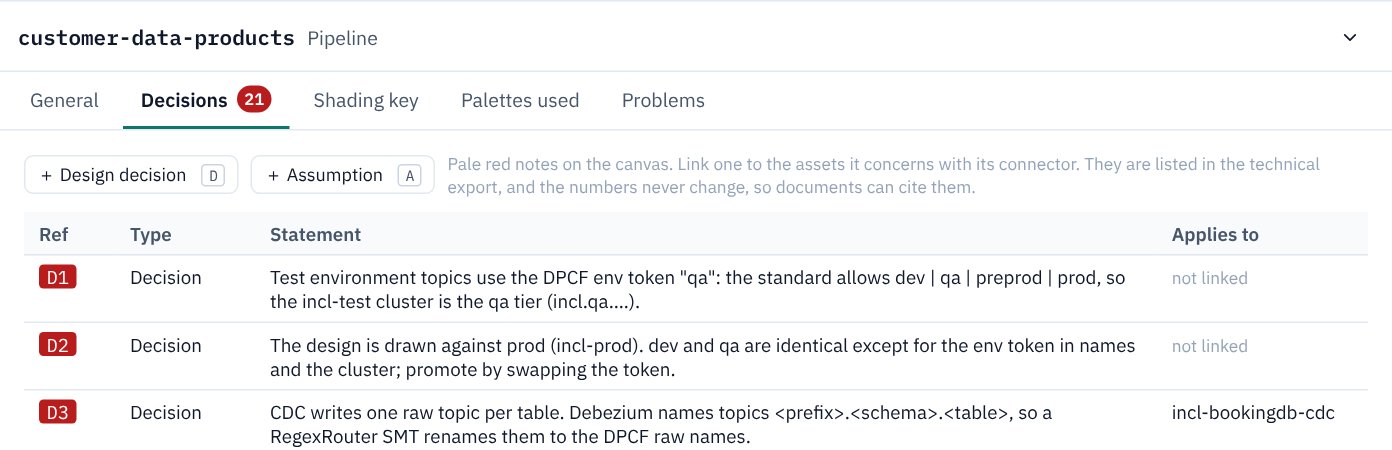
With nothing selected, the pipeline's Decisions tab lists every decision and assumption in order, with the assets each one applies to. Click one to go to it on the canvas.
When and who
Each decision and assumption records the date it was made and who made it. Both are stamped automatically when you create it and shown as editable columns on the Decisions tab, so you can correct the date or change the author.
KPD has no login, so the author comes from a name you set once in the tab's header — it is remembered in your browser and used as the default for new decisions, assumptions, dependencies and actions. Leave it blank and entries are simply unattributed until you fill one in.
Next actions
The pipeline's Actions tab is a running list of outstanding actions, cited as ACN1, ACN2… Give each a short description; KPD records when it was documented and by whom (the same author default as decisions), both editable. Like decision references, ACN numbers are never reused when an action is deleted. Actions are documentation only — they never affect validation or Terraform.
In exports
- The technical export has Design decisions and assumptions and Dependencies & pre-requisites sections with the date and author of each, a Next actions table, and quotes each one under the assets it is linked to.
- The detailed design document lists them under Design Decisions, Assumptions and Dependencies, each kind its own table with date and author columns, and a Next Actions table. Its diagrams leave the notes out, so the picture shows only how the pipeline fits together.
- The PNG export includes decisions, assumptions and dependencies as drawn on the canvas (actions live only on the tab, not the canvas).